
Lead capture systems enable local businesses to acquire prospect data without requiring a website visit. This methodology reduces friction in the customer journey by utilizing native platform features.
Step 1: Configure Google Business Profile for Direct Engagement
Google Business Profile (GBP) provides native tools for lead acquisition. Activating these features captures high-intent local traffic within the search interface.
Technical Requirements
- Enable Messaging: Navigate to the GBP dashboard. Select 'Messages'. Activate the chat feature.
- Request a Quote: Enable the 'Quote' button to allow users to submit service inquiries directly.
- Call Tracking: Implement a unique tracking number to log inbound calls from the profile.

Step 2: Deploy Meta Lead Ads for Instant Conversion
Meta Lead Ads utilize "Instant Forms" to collect user data within Facebook and Instagram. This bypasses external landing pages.
Implementation Process
- Form Creation: Define fields (Name, Phone, Email, Service Type).
- Privacy Policy: Link to a valid privacy policy to comply with Meta requirements.
- Lead Sync: Connect the ad account to a central lead management system.
Step 3: Integrate WhatsApp Business for Real-Time Capture
WhatsApp Business provides a direct communication channel. It serves as a capture point via Click-to-WhatsApp ads or profile links.
Operational Setup
- WhatsApp API: Use the Cloud API for automated lead routing.
- Automated Greeting: Configure a standard response to acknowledge new inquiries.
- Data Push: Use webhooks to transmit contact information to the CRM.
Step 4: Centralize Data in Zoho CRM
Lead management for small business requires a centralized database. Zoho CRM serves as the primary repository for data gathered from Google, Meta, and WhatsApp.
Configuration Steps
- Lead Source Mapping: Create fields to identify the origin of each lead (e.g., "GBP Quote", "Meta Form").
- API Integration: Utilize Zoho Flow or third-party middleware to synchronize external leads into the CRM.
Step 5: Establish Automated Follow-Up Protocols
Automation ensures immediate engagement. Systems must trigger actions based on lead creation events.
Automation Rules
- Instant Notification: Trigger internal alerts for sales personnel upon lead entry.
- Automated SMS/Email: Deploy a standard acknowledgment message within 5 minutes of capture.
- Task Assignment: Automatically assign leads to relevant staff based on service type.
Service Packages
Amaryllis Digital Studio provides standardized implementations for these systems.
Starter Business Visibility Package
- Scope: GMB, Facebook, Instagram, and WhatsApp setup.
- Price: $795.00
- View Package Details
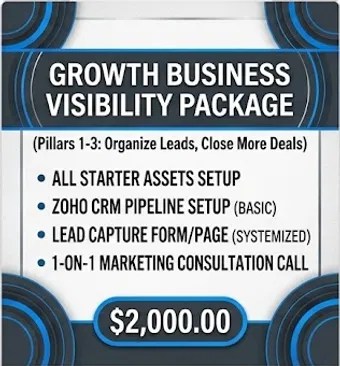
Growth Business Visibility Package
- Scope: Zoho CRM pipeline setup and lead capture forms.
- Price: $2,000.00
- View Package Details
Authority Business Visibility Package
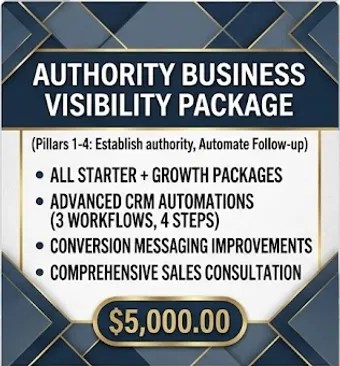
- Scope: Advanced CRM automations and conversion messaging.
- Price: $5,000.00
- View Package Details
Leave a Reply